
Practical guide for beginners
Build one useful funnel before you build a complicated business system.
Disclosure: This article contains a Systeme.io affiliate link. If you choose to sign up through it, Rimeen may receive a commission at no extra cost to you. Our recommendations are based on fit, clarity, and practical use—not on a promise of income or rankings.
If you are searching for the Systeme.io free plan, you probably want a simple answer: can one platform help you create a landing page, collect leads, send follow-up emails, and sell a small offer without paying for several separate tools? For many beginners, the answer is yes—but only if you start with a narrow workflow and understand the plan limits before you build.
This guide explains how to use Systeme.io as a beginner-friendly funnel builder, what to set up first, which integrations are useful, and where the platform may not be the best fit. It also fills a common gap in pricing and review articles: showing the actual first funnel a small business can build, not just listing features.
Quick answer: The Systeme.io free plan is a sensible starting point for testing one lead magnet, one short email sequence, and one simple offer. Keep the first version small, measure every step, and upgrade only when your contacts, funnels, or products genuinely require more capacity.
What is Systeme.io, and who is it for?
Systeme.io is an all-in-one platform built around online marketing and selling. Its official site currently groups together sales funnels, email marketing, a website builder, marketing automation, online courses, affiliate management, communities, booking, pipelines, webinars, and other business tools. See the official Systeme.io overview.
That range is useful when you want fewer disconnected tools. It can also feel like too much if you try to configure everything on day one. The best starting audience is usually a creator, freelancer, coach, consultant, educator, or small business owner who has one clear offer and wants a straightforward path from visitor to subscriber to customer.
It is less suitable when your business needs a deeply customized enterprise CRM, complex permissions, advanced ecommerce operations, or a large team with highly specialized systems. A useful platform is not the one with the longest feature list; it is the one your team will actually finish setting up and maintain.
What do you get with the Systeme.io free plan?
According to the current official pricing page, the free plan supports up to 2,000 contacts, three sales funnels, one blog, one course, one affiliate program, and one custom domain. The page also says the free plan does not expire and does not require a credit card. Limits and prices can change, so check the official Systeme.io pricing page before making a purchase.
| Your first goal | What to build | Why it matters |
|---|---|---|
| Collect interested leads | One landing page and opt-in form | You can measure visits and sign-ups. |
| Follow up consistently | A short welcome email sequence | New subscribers receive a useful next step. |
| Test an offer | A simple checkout or sales page | You learn whether the offer is clear before scaling. |
Free plan strengths
The strongest reason to begin with the free plan is not that it contains every advanced feature. It is that you can validate a small system with less financial pressure. You can test your message, landing page, email sequence, and offer before committing to a larger software stack.
Free plan limitations to watch
The free plan is not unlimited in every area. Funnel, course, contact, automation, and domain allowances matter as your business grows. Do not choose a plan from a screenshot or an old review alone. Confirm the current limits on the official pricing page, especially if you need multiple products, several courses, more automation rules, or a larger contact list.
How to build a simple Systeme.io sales funnel
The practical content gap around Systeme.io is that many pages discuss pricing or alternatives without showing a beginner workflow. The following setup is intentionally small. It gives you a working foundation and creates clear points to improve later.
Step 1: Choose one audience and one promise
Start with a single problem your audience already understands. For example, a fitness coach might offer a short meal-planning checklist, while a web consultant might offer a website launch checklist. One audience and one promise make the page easier to write and the results easier to measure.
Step 2: Create a useful landing page
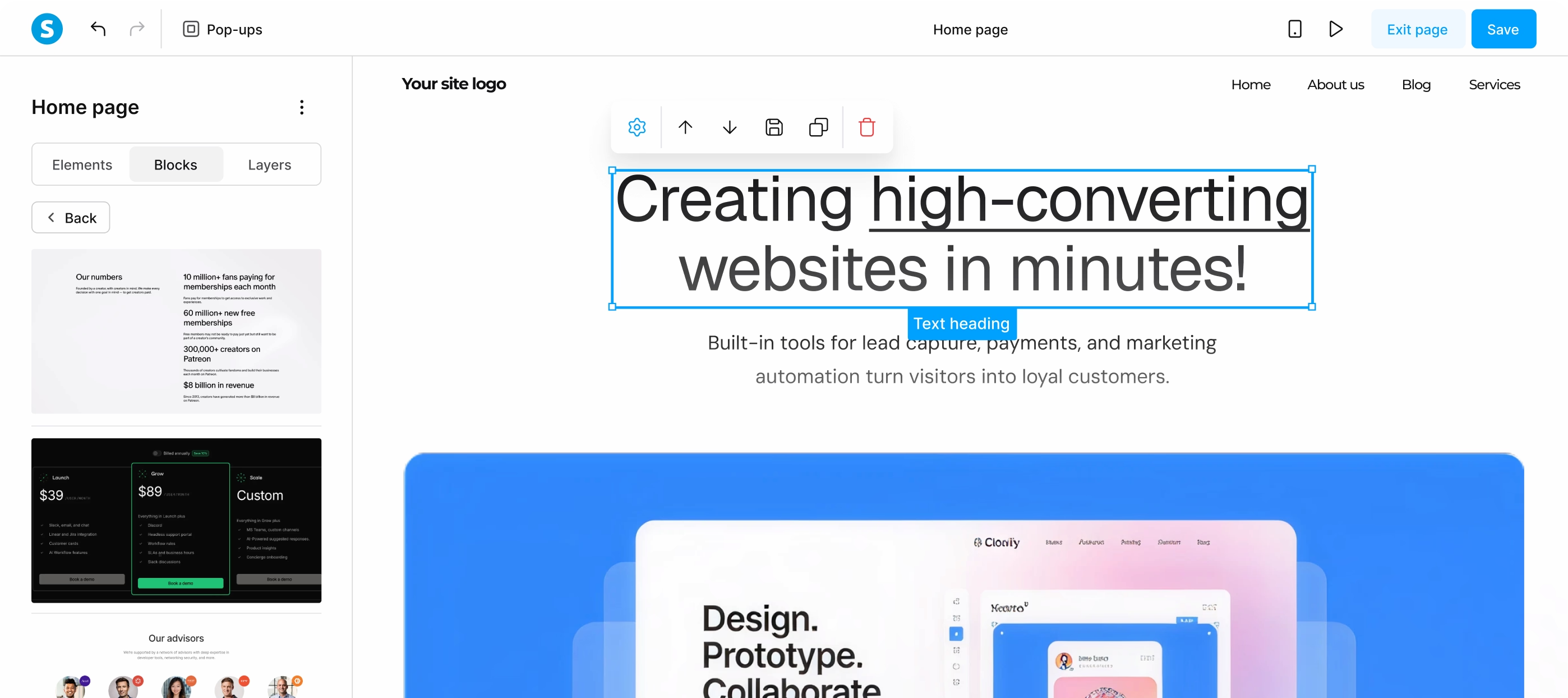
Use the page editor to create a clear headline, two or three benefits, a short explanation of what the visitor receives, and one primary call to action. Avoid filling the page with every service you offer. The first page has one job: help the right person understand why subscribing is worthwhile.
If you need broader website guidance, compare this setup with Rimeen’s small-business website launch checklist. The same fundamentals apply: clear navigation, mobile-friendly design, accurate information, and an obvious next step.
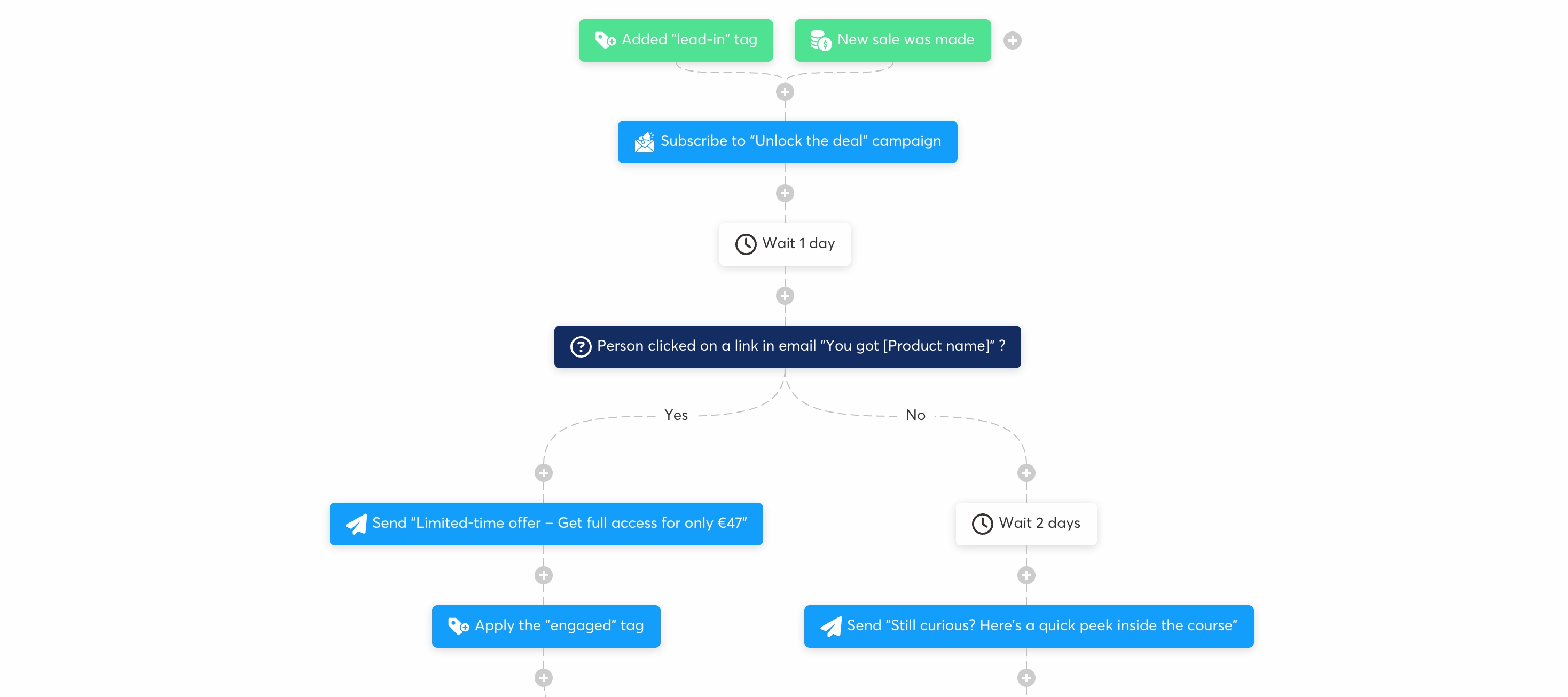
Step 3: Connect the form to a short email sequence
Your first sequence can be three emails. Email one delivers the promised resource. Email two explains a common mistake or gives a practical example. Email three introduces your paid offer or invites the reader to reply with a question. Keep the tone helpful and avoid pretending that automation replaces trust.
Step 4: Add the offer and payment path
If you sell a consultation, course, template, or digital download, keep the checkout path simple. Explain what the customer gets, who it is for, what happens after payment, and where to ask for help. Check the full customer journey yourself on a phone before sending traffic to the page.
Step 5: Track the small numbers
Do not judge the funnel only by sales. Track landing-page visits, opt-in rate, email clicks, replies, checkout starts, and completed purchases. A low opt-in rate may indicate a weak promise. Good sign-ups with few sales may indicate that the offer or follow-up needs clarification. These observations are more useful than adding another tool too early.
Small-business rule: If you cannot explain the funnel on one sheet of paper, simplify it before adding more automation.
Which Systeme.io integrations are useful first?
Search demand for Systeme.io integrations includes both native connections and external automation tools. For a beginner, the right choice depends on what you need to do with the data, not on how many apps you can connect.
Use a native workflow when the task is simple
For example, you may want a new lead to receive an email, enter a campaign, or trigger a follow-up step. A native workflow keeps the system easier to understand and reduces the number of places where a failure can occur.
Use Google Sheets when you need a lightweight operating view
The official help documentation explains how to connect Google Sheets, choose a file and worksheet, map fields, and test the workflow. It also notes that the sheet should already contain column headers and that the “Add a new row” action is used in Workflows. Read the current Systeme.io Google Sheets integration instructions before setting up your own process.
Use an external connector when you genuinely need cross-app work
Zapier, Make, Integrately, and similar services can be useful when a workflow must pass information between several platforms. They also add another account, permission layer, and possible failure point. Start with one test record, limit the data shared, and document what should happen when the connection fails. Rimeen’s guide to business workflow automation offers a broader way to prioritize safe, measurable processes.
Systeme.io compared with a larger tool stack
An all-in-one platform can reduce the number of subscriptions and integrations you maintain. The trade-off is that a specialized tool may offer deeper features in one area. Before choosing, list the exact work you need to complete: pages, email delivery, payments, courses, booking, affiliate tracking, reporting, or team permissions.
If your list is short, a simpler platform may be enough. If your process depends on advanced reporting, complex customer segmentation, or unusual integrations, compare the limits carefully. The goal is not to find the tool with the biggest promise. It is to find the smallest reliable system that supports your current offer.
Ready to test the first version?
Explore Systeme.io through this affiliate link and confirm the current plan limits before you build.
Common beginner mistakes to avoid
Building too much too soon. A funnel with six pages and twelve automations is not automatically better. Build one path, test it, and only then add complexity.
Copying a competitor’s promise. Ranking pages can reveal what topics exist, but your article and funnel should answer your audience’s actual problem in your own words.
Ignoring mobile testing. Forms, buttons, tables, and checkout steps must be easy to use on a small screen. Test the whole journey as a first-time visitor.
Forgetting privacy and consent. Collect only the information you need, explain what subscribers will receive, and use the platform’s current settings and documentation.
Judging results too quickly. A new funnel needs enough relevant visitors and a clear measurement window. Improve one element at a time so you know what changed.
Frequently asked questions
Is Systeme.io really free?
The official pricing page currently describes a free plan that does not expire and does not require a credit card, with limits on contacts, funnels, courses, and other areas. Always verify current terms on the official page because plans can change.
Can I use the Systeme.io free plan for a small business?
Yes, it can be a practical testing environment for a small lead magnet, welcome sequence, and simple offer. Whether it remains suitable depends on your contacts, number of funnels, products, automation needs, and domain requirements.
Does Systeme.io have integrations?
Yes. Systeme.io offers integrations and workflow actions, and external services can connect it to other applications. Use the simplest connection that meets the business requirement, then test permissions and failure handling.
Is Systeme.io better than ClickFunnels?
There is no universal winner. A beginner comparing Systeme.io and ClickFunnels should look at current pricing, included features, funnel limits, email needs, templates, support, and the complexity of the offer. Start with the workflow you need rather than a general “best platform” claim.
Can Systeme.io replace every marketing tool?
It may replace several tools for a straightforward creator or small-business setup, but no platform is ideal for every business. Confirm the specific features, integrations, reporting, and permissions your operation depends on.
Final recommendation
Systeme.io is worth testing when your immediate goal is to connect a landing page, email follow-up, and simple offer in one place. The strongest beginner strategy is not to activate every feature. It is to build one useful funnel, connect only the data you need, measure the customer journey, and upgrade only when a real limit appears.
For more practical help choosing tools and improving your digital foundation, visit Rimeen’s digital services page or contact Rimeen with a project question. You can also read the small-business marketing automation starter system for a related workflow approach.
Sources: Systeme.io official overview · Systeme.io pricing · Systeme.io Google Sheets help · Zapier Systeme.io integrations
Comments
Post a Comment